Scorer Guide
Match analysis
An extra, beyond refereeing. Any match in Recent matches (Recent on match setup) can show how it went, player by player. A player or coach keeping score can also use analysis mode, which counts how many times the ball was hit and shows the analysis during the match.
The analysis
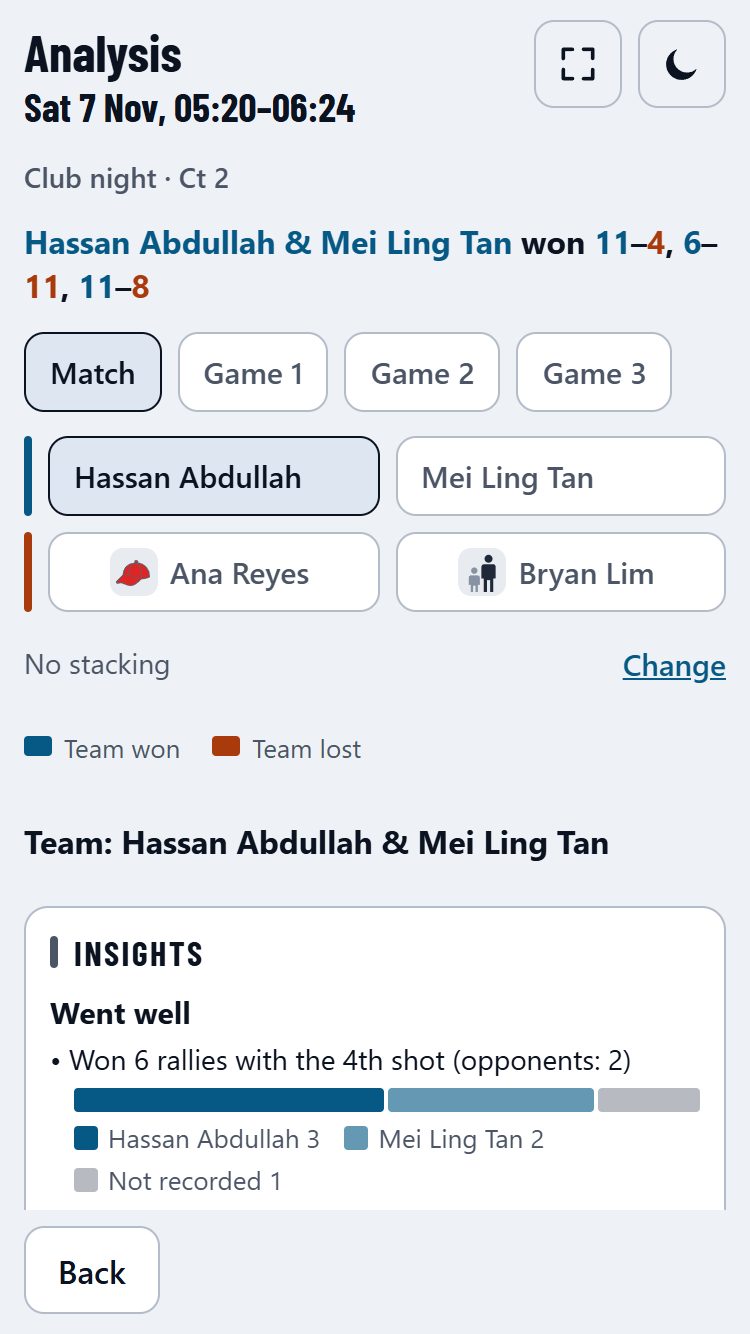
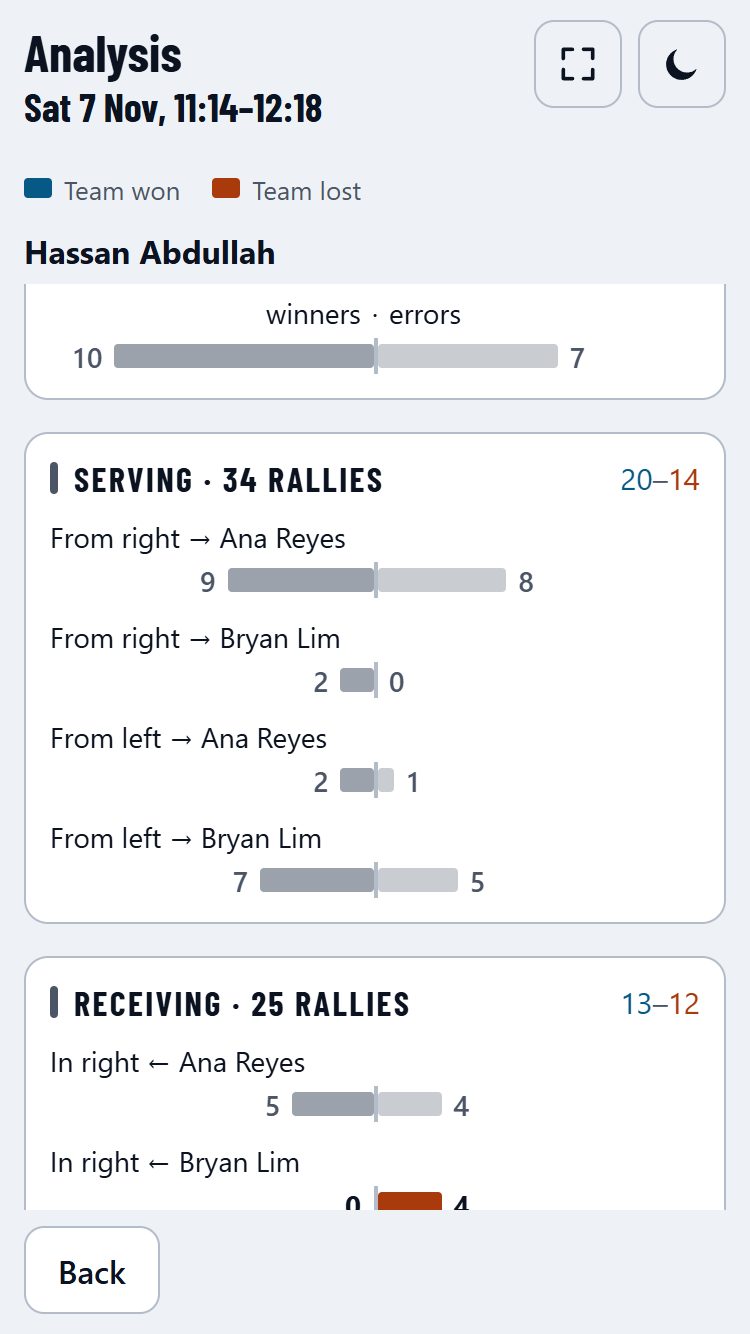
On a match’s page, Analysis shows the whole match or one game (Match, G1, G2 …; a one-game match has no such choice). These choices, and the team and player names below them, stay at the top while the figures scroll, and picking another goes back to the top of its figures. It opens on Summary: the key numbers, the game flow and every player, the same for both teams. In doubles, each team then has Team and Players: Team shows the team’s cards, Players its two players side by side, a column each, so you see at once who did what. In singles the player’s cards follow their team’s. The team’s card is its rallies won and lost on its own serve and on the return. Each player’s are:
- Serving: from the right or left, to each opponent.
- Receiving: in the right or left, from each opponent.
- Position: on the right or left, on their own team’s serve or the other team’s.
Reading the bars
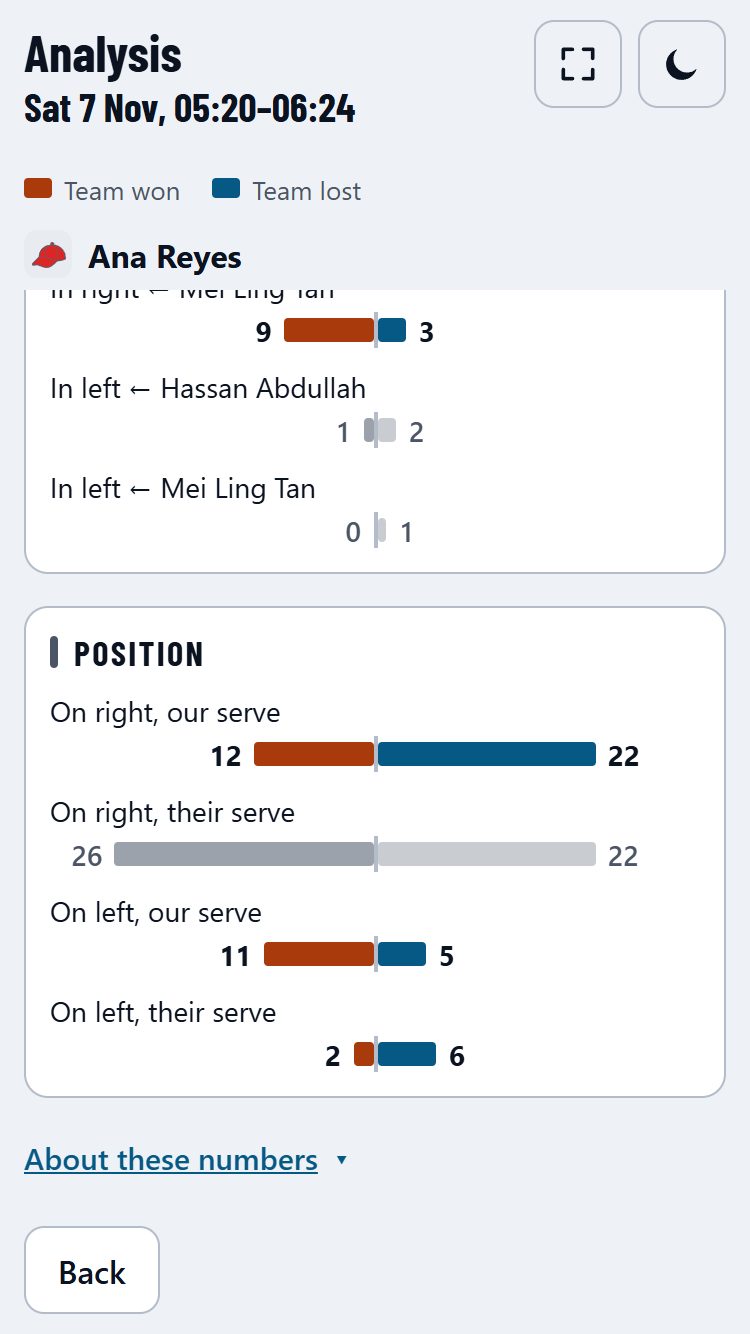
Each line is a bar: won to the left in the player’s team colour, lost to the right in the opponents’ colour, with the count at the end of each.
Rallies are credited to the team, not to who hit the last shot, and one match has only a few rallies in each line, so read them as a hint.
A line that’s about even, such as 2–2 or 12–9, is drawn in grey. The ones that stand out (3 or more apart, the bigger at least 60% of the rallies, such as 7–1, 3–6 or 7–12) keep their colour and catch the eye. Every line stays, with its numbers.
The serve and the return are the exception: faults and return errors are expected to be near none, so their lines always keep their colour. 3 return errors in 7 serves is worth seeing however the winners came out.
With only a few rallies
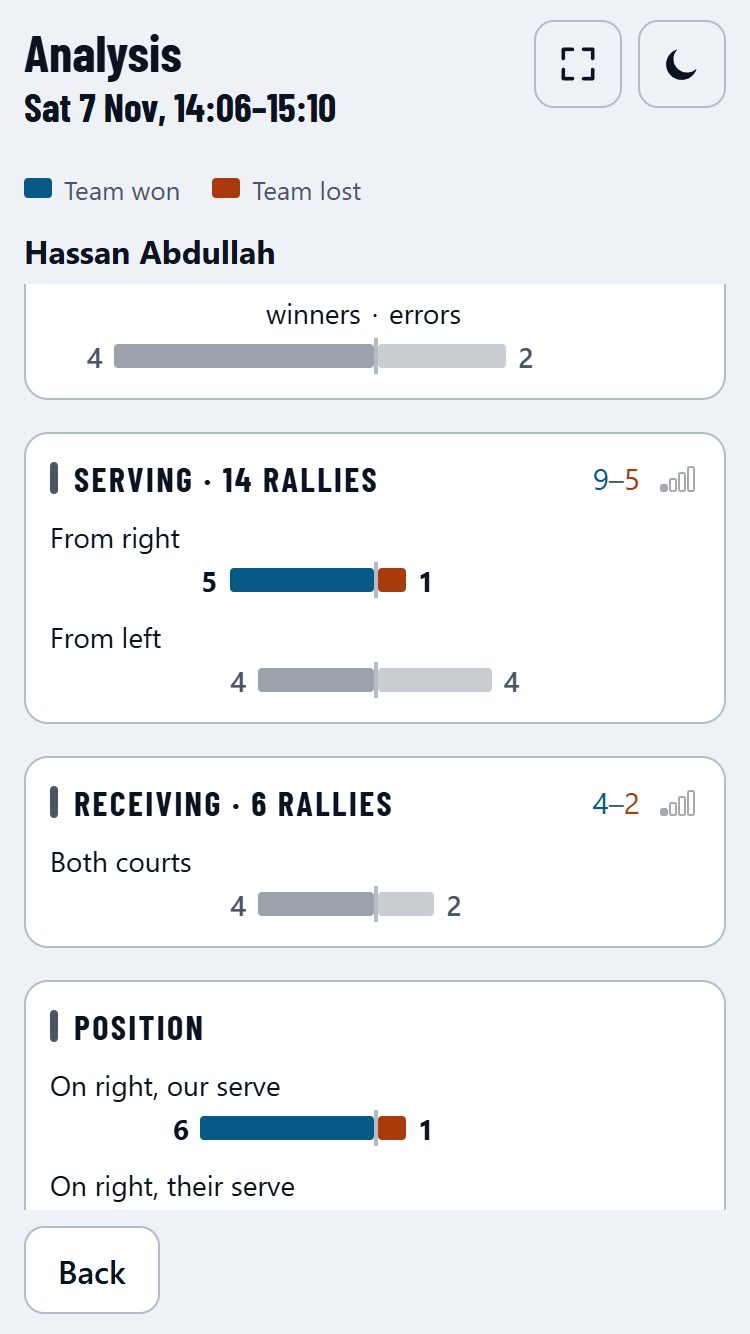
What’s shown follows how much there is to go on. A line with nothing in it is left out. A split needs about five rallies a line: with fewer, Serving and Receiving show by court alone, then as one total, and Position by side, or not at all.
A card showing less than it would for want of rallies carries a weak-signal mark (four rising bars, the first filled) by its heading: tap it to see why. So a single game, or a match to 11, shows a shorter, coarser analysis than a best of 3, and the detail fills in as there’s more of it.
Stacking
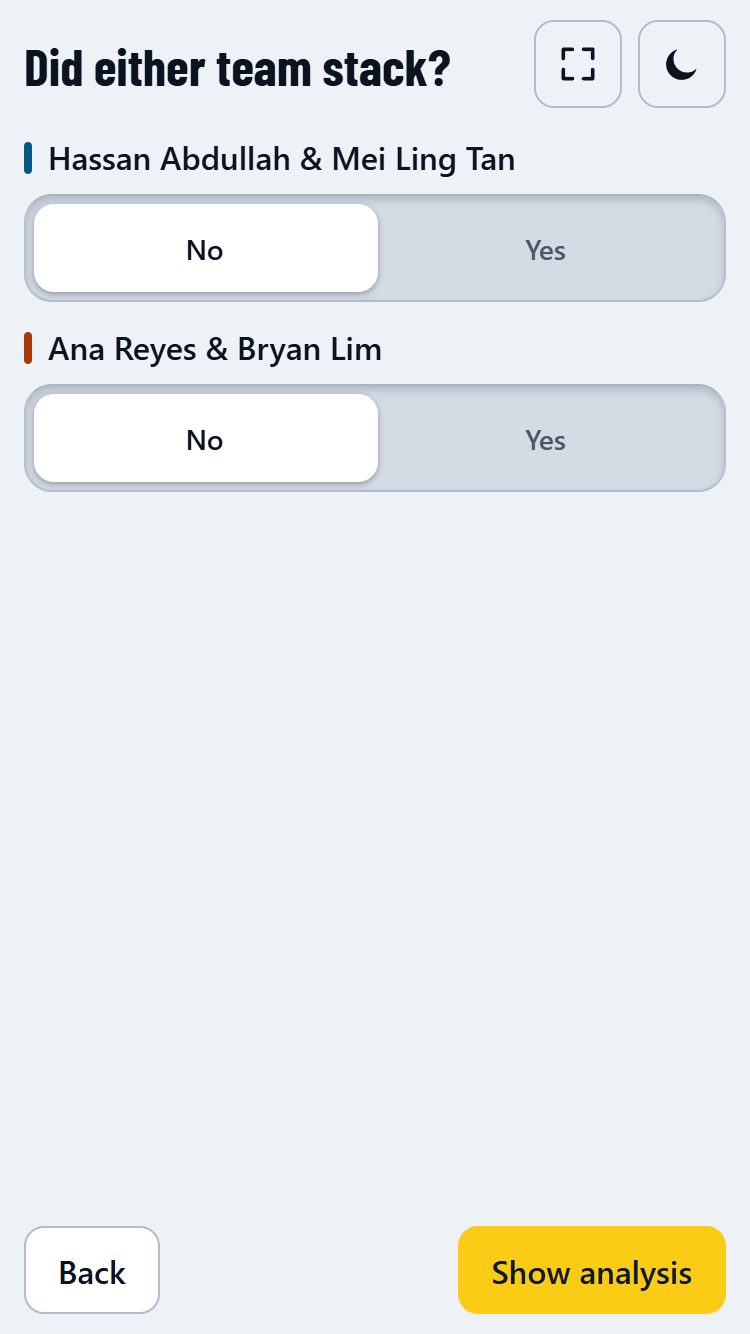
In doubles it first asks whether either team stacked (switched sides after the serve or return so each player covers their preferred side): who covered the left, whether always, only when serving or only when receiving, and in which games.
That only changes the Position figures. Change corrects it later, for one game or the whole match.
Analysis mode
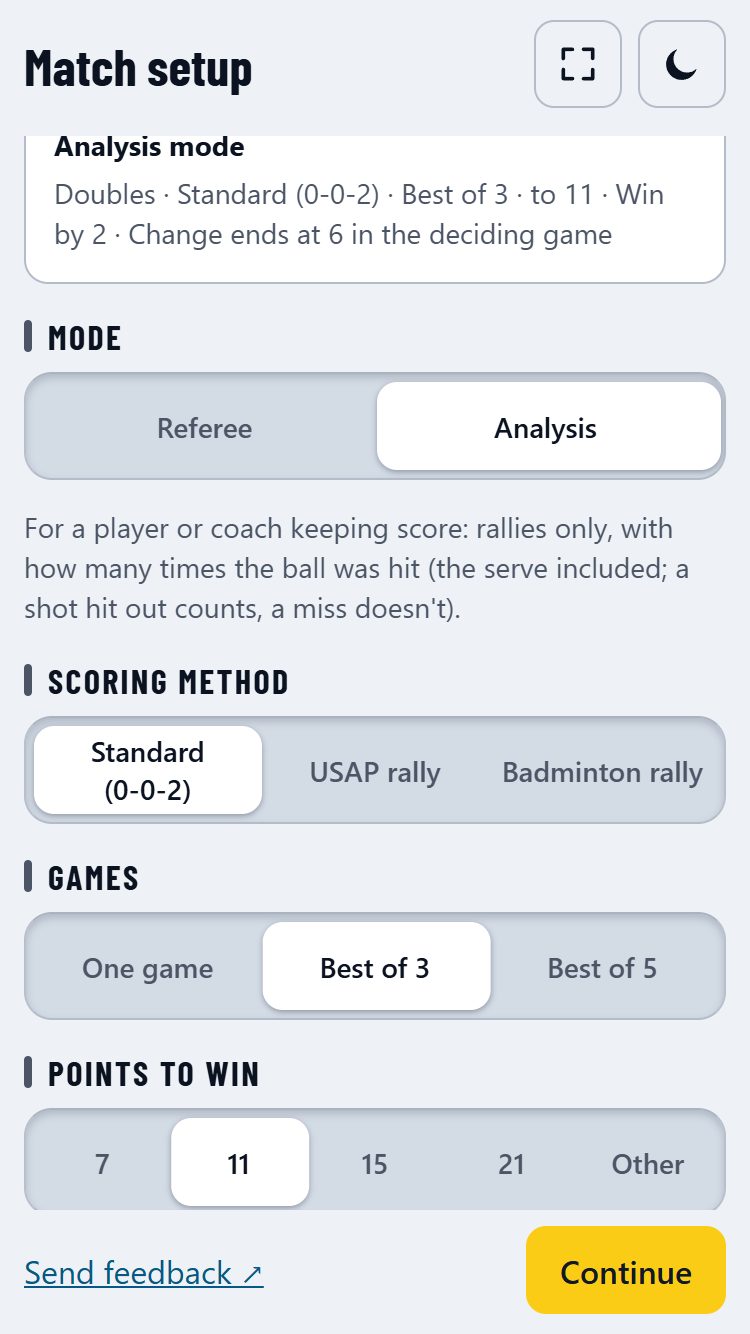
For a player or coach keeping score, not a referee: choose Analysis under Mode, the first of Match setup’s settings (tap Edit if they’re folded away). The scorer remembers it for the next match. While it’s on, the settings summary starts with Analysis mode and the button reads Continue.
The scorer then keeps to rallies:
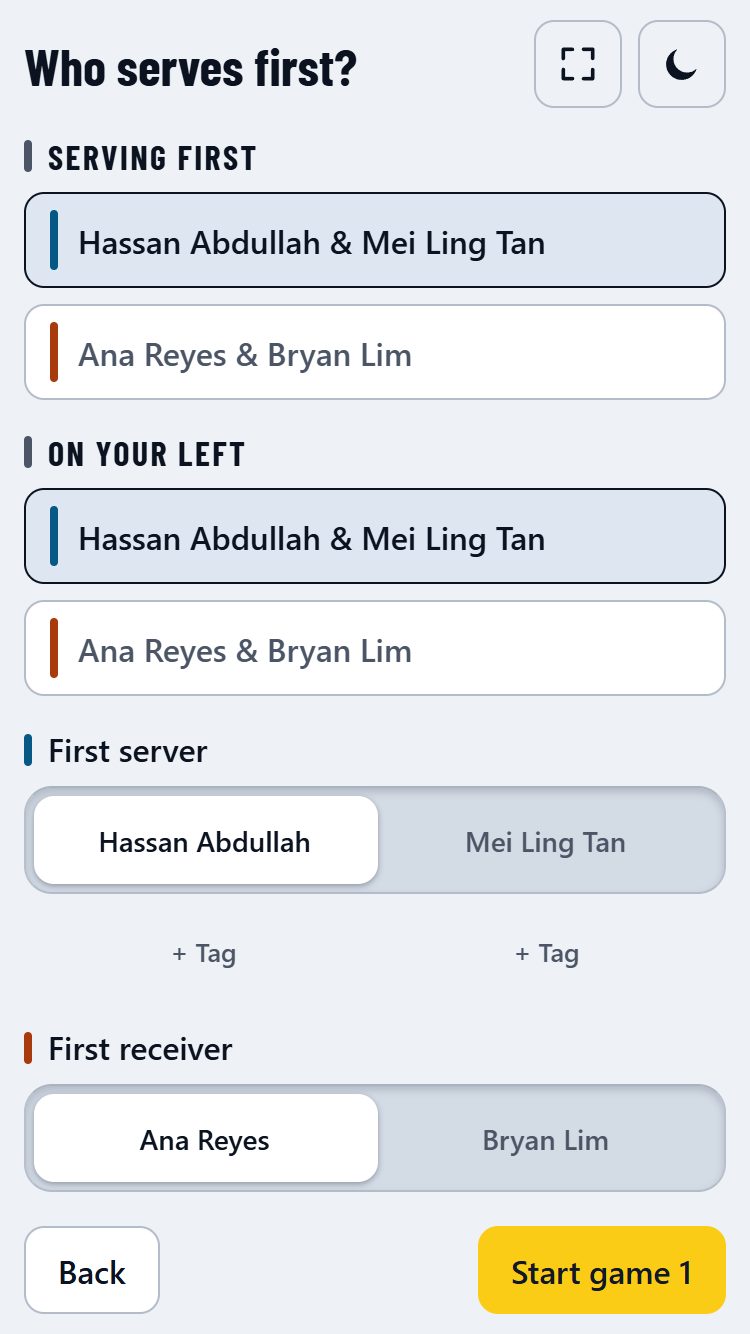
- No briefing, coin toss or warm-up: one screen asks who serves first, which team is on your left and, in doubles, each team’s first server and receiver.
- + Tag under each player marks how to tell them apart (a red cap, the taller one), handy for opponents you don’t know. Set them while the players warm up.
- No time-outs, penalties, challenges or forfeits. More keeps what rallies need: correcting the server, changing a tag, rally history, flip view, Next game and End match.
- Score a whole game or only part of one: Next game stops the game where it stands (it counts for neither team) and goes on to the next; in the last game it reads Stop the game. End match keeps the match in Recent matches.
- Analysis, beside More, opens a short read of this game, ready for a talk at the break (below). Back to scoring returns.
- Nothing to confirm with the players and nothing to share: the match is tagged Analysis in Recent matches. Finish match (or End match) opens its analysis straight away; Back goes to Match setup for the next match.
Eyes on the match
In analysis mode you don’t have to look at the phone while a rally is played. Everything it needs goes in with your thumb while you watch the court: the whole court is the target, so there’s nothing small to aim for. Hold the phone either way up, as for refereeing: upright, the teams stay side by side, and Drive and Drop sit under the two halves.
- As the 3rd shot is hit, swipe the way the ball went: down for a Drop, sideways for a Drive, up for a Lob. Start anywhere on the court or the strip above it.
- Once the rally passes 4 hits, double tap the court (either side) or the left or right part of the strip above it: that’s 5+ hits.
- When the rally ends, tap the side that won it, as always.
You can tell each one went in without reading the screen. The court washes in a colour you’ll catch from the corner of your eye: yellow for a drive, violet for a drop, green for a lob, grey for 5+. On Android the phone also buzzes twice (a scored rally buzzes once). A swipe or a double tap never scores a rally, so a slip costs nothing: swipe again to change the shot.
Then one glance between rallies. After a long rally, with the shot swiped and the double tap given, the only question left is who hit the last shot; after a shorter one, how many hits.
To try it before a match, tap Tutorial on Match setup and choose Analysis (it’s also offered once, before your first analysis match): a practice rally walks you through all three swipes, the double tap and the last shot, on the real court. Nothing is kept.
The details: the 3rd shot as it’s played and a long rally as it’s played.
At a break: this game
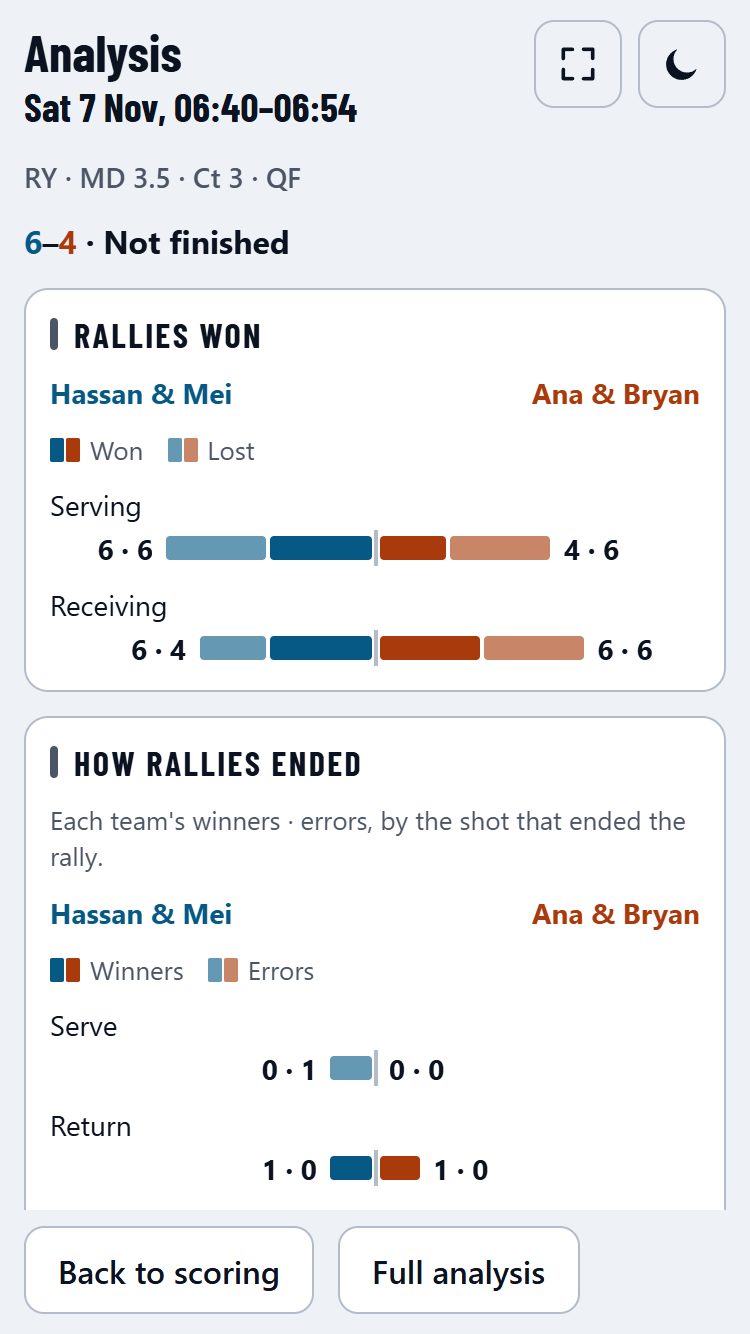
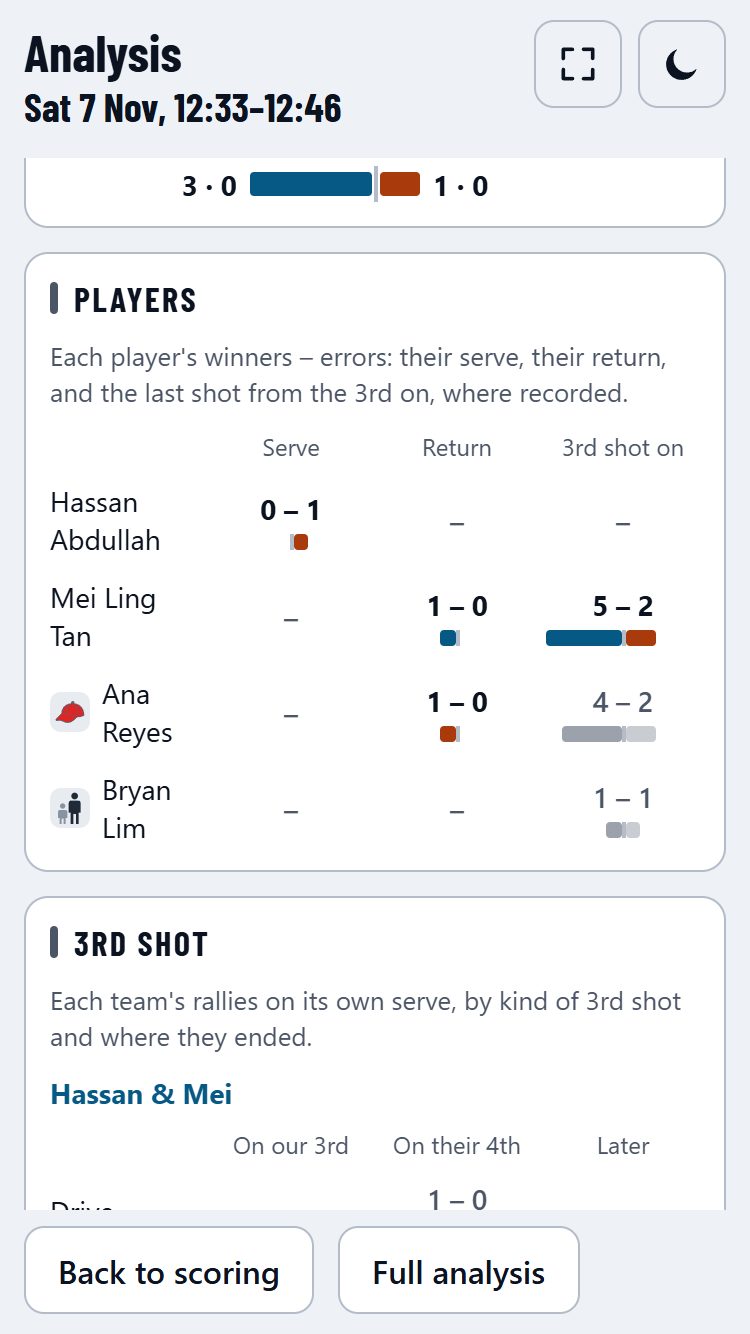
A break is a minute, so Analysis from the scoring screen opens on what a coach can say in one: this game (or Match so far, once there’s a second). Turn the phone upright to read it: held sideways, it asks you to (or tap Read it sideways if the phone can’t turn). Both teams are in view, most useful first:
- Stands out: a few lines picked from the numbers, such as a run going on now (“Bryan & Ana: 3 points in a row”), the player winning most and the one losing most with their last shot, a team clearly better returning or serving, and a 3rd shot that clearly works or doesn’t. Only what the cards below would show in colour.
- Game flow: the game’s score rally by rally, with its longest run.
- Serve & return: won serving, side-outs and points per service turn, as in Key numbers.
- 3rd shot: for each team, on its own serve, the same grid as the full analysis, without the columns nothing reached yet; a cell that stands out is coloured.
- Players: a grid, a row per player and a column each for their serve, their return and, where recorded, the last shot from the 3rd on, each cell won – lost.
Full analysis opens the whole of it; This game comes back. With hit counts for under half the rallies, the weak-signal mark and “Hit counts: 5 of 18” stand in for figures built on a few.
Counting hits
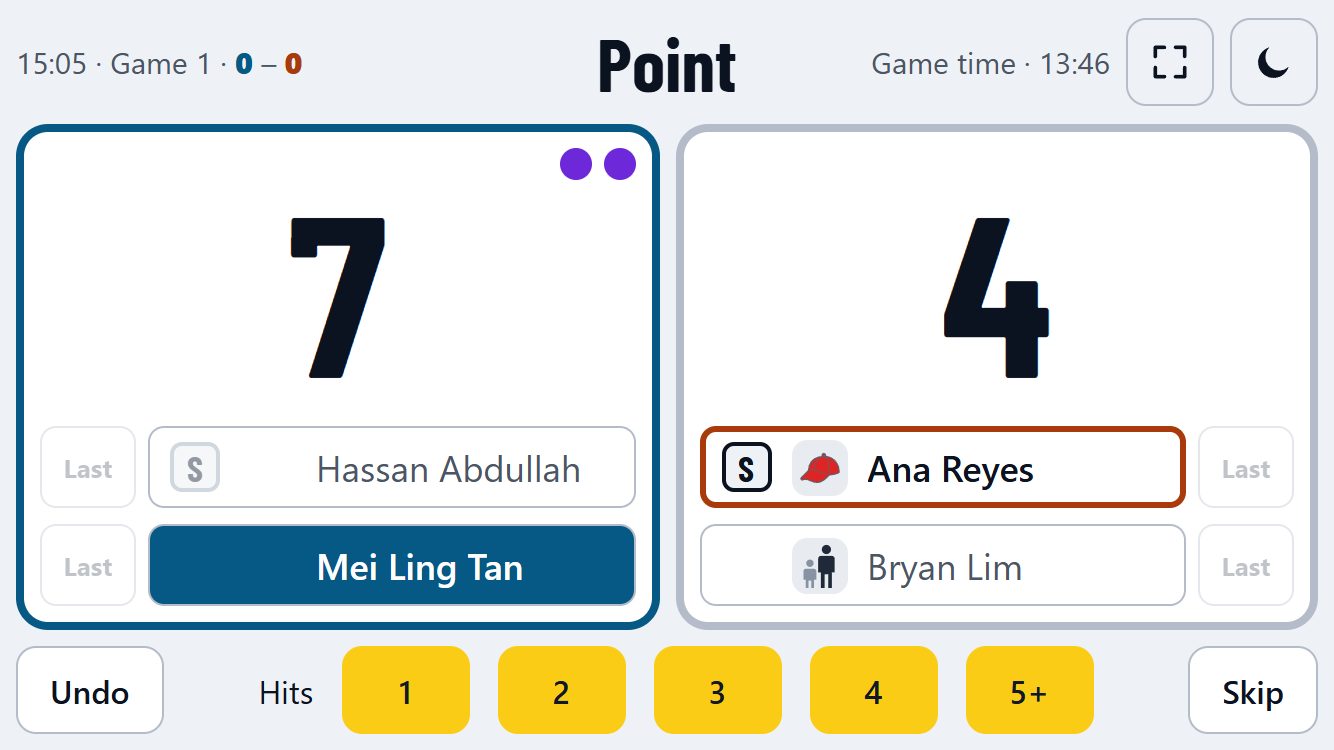
In analysis mode, after each rally the footer asks how many times the ball was hit: 1 (the serve), 2 (the return), 3, 4 or 5+.
What counts as a hit
Count each time a paddle struck the ball, the serve included: a shot hit out or into the net counts; a missed swing, or a ball not reached, doesn’t. So a service fault is 1, and a return hit out is 2.
A 1 the servers won counts as a serve not returned, whatever the reason (a fault by the receiving team, say).
Skip, or just scoring the next rally, leaves the count blank. Undo takes back the rally itself.
What the counts add
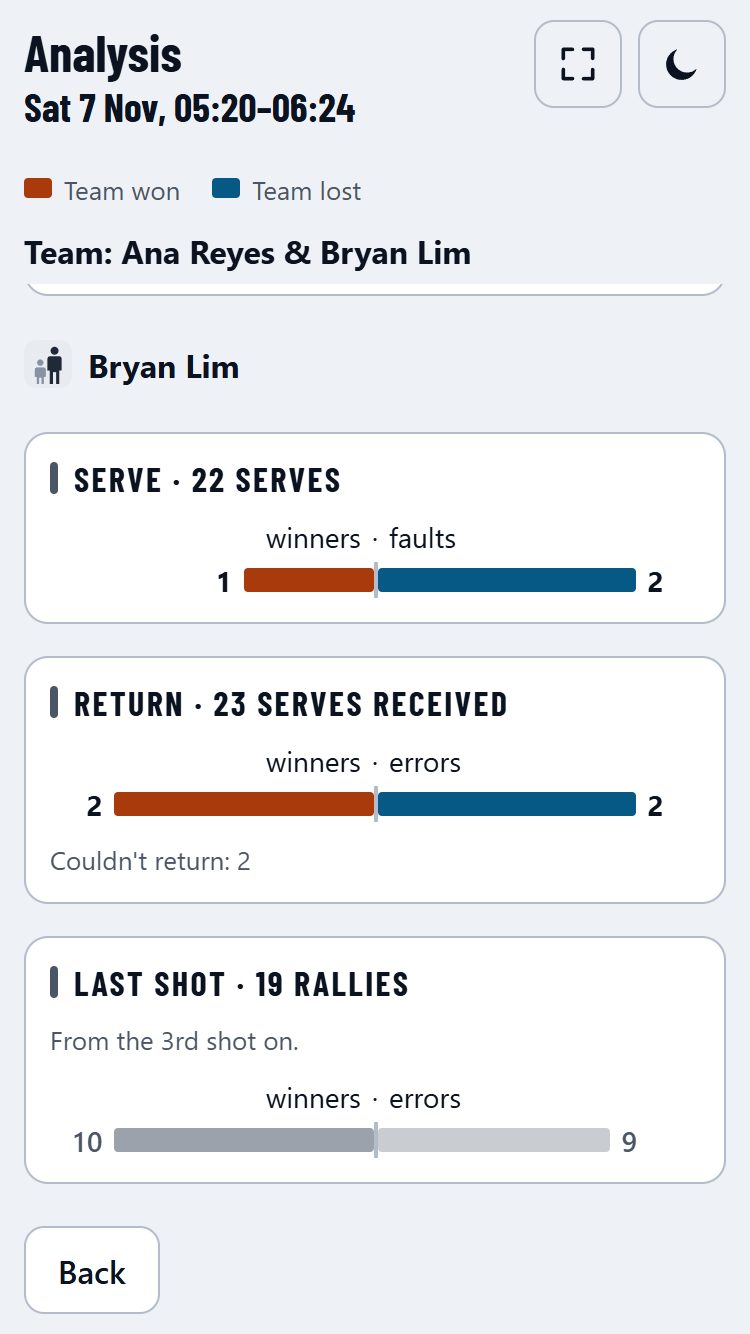
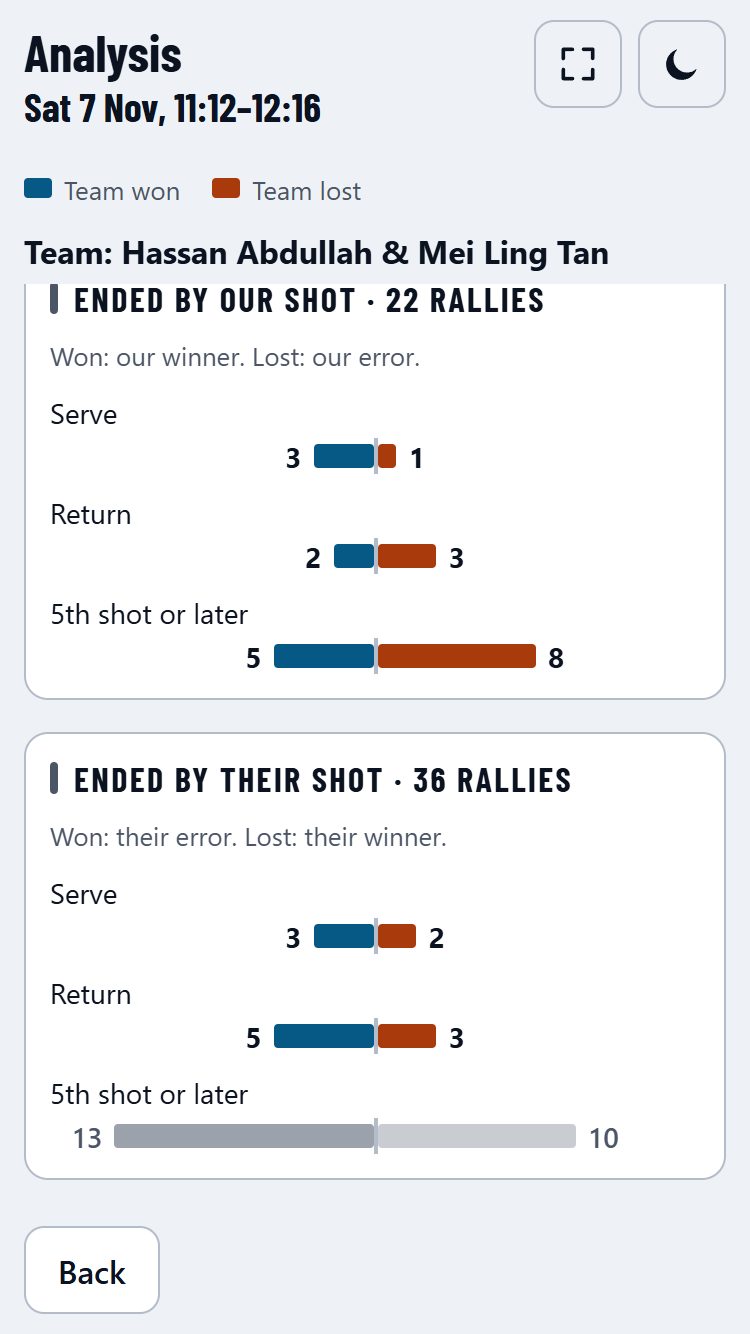
- Each player gets a Serve card (winners and faults) and a Return card (winners and errors, and the serves they couldn’t return).
- The team gets, under How rallies ended, two grids with a column each for Our ball and Their ball, whichever was last, each cell won – lost: By shot (serve, return, 5th shot or later) and By game. With our ball, won is not returned and lost is ours out or into the net; with theirs, won is theirs out or into the net and lost is not returned by us. A cell that stands out sits on a tint of the colour of the side that came out ahead, each number in its own side’s colour; an even one stays grey. Then Rally length (short, medium and long rallies), or one line when nearly every rally was long.
With a team’s figures (or in singles), the match comes first:
- Key numbers, both teams head to head, like a match-stats panel: the points as a big scoreline, then each figure with a team’s value at each end and a bar for each under it, the leader’s at full length and bold. They come in four groups: Result (rallies won); Serving (won serving; side-outs, the rallies won receiving, so the serve came back; points per service turn, and in side-out doubles per first and second server, where the game’s first serve counts as the second server, as its call “0-0-2” says); Momentum (the longest run of unanswered points, points in runs of 3 or more); Pressure (close and late won, game points won).
- Game flow: each game’s score rally by rally, a line per team in its colour. Each step up is a point; flat stretches are rallies that scored nothing, the serve changing hands. A steep climb is a run. A dotted line marks half-way, where players change ends (6 in a game to 11). Each game’s heading gives the winner in their colour and how many rallies it took, and the line under it the game’s longest run of unanswered points (from 3), also shown as a faint band in that team’s colour: where the game turned.
Each team’s figures also say When it mattered: rallies with both teams within 4 points of winning the game (7–7 or later in a game to 11), its own game points and how many it won, and the opponents’ and how many it saved. Serving and receiving give their percentages, and are in colour only when they differ from the opponents’ by 8 points or more, as losing more serves than you win is usual. Each 3rd-shot row gives, beside its name, how often that kind was hit (“Drive 29%”, of the 3rd shots whose kind was recorded), and under it the row in all (“9–14 · won 39%”). Where nearly every rally reached 5 hits, as in pro play, Rally length is one line.
Above the team’s figures, a Players card puts every player side by side: a row each, in their team’s colours, and a column each for their serve, their return and their Last shot from the 3rd on. Each cell counts only the rallies that player ended with their own ball, won – lost, so they aren’t points: the serve not returned – faults, the return winners – errors, the last shot not returned – out or into the net. It follows the Match or Game chips, and shows under Summary.
The 3rd and 4th shots have a section of their own (below).
The scorer records whose ball was last and where it went, not why. So it says “not returned” and “out or into the net”, not “winner” and “error”: a ball put into the net may have been forced by a good shot. The serve and return keep “faults” and “errors”, as those are rarely forced.
Insights
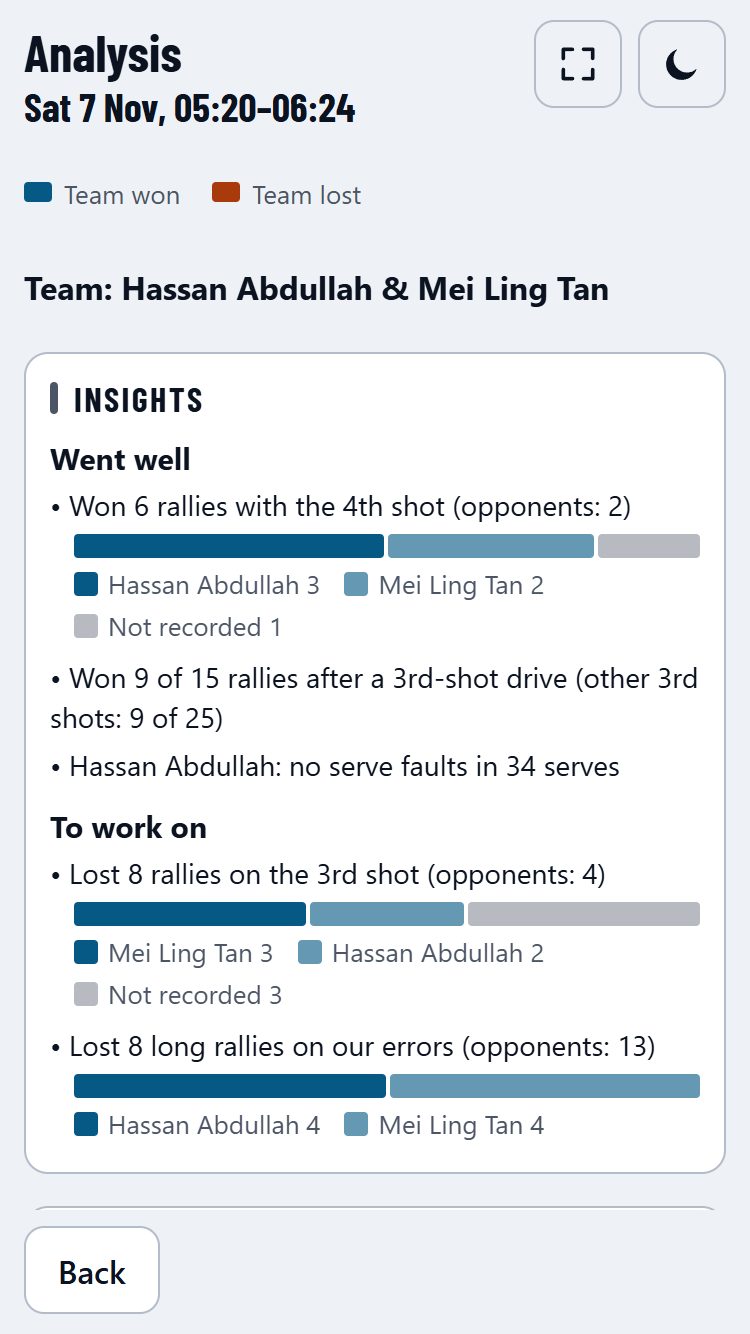
With hit counts for at least 80% of the rallies (and at least 30), an Insights card lists what went well and what to work on, as facts with their numbers, such as “Lost 6 rallies on the 3rd shot”.
It never guesses a cause: the counts say which shot ended a rally, not why. Insights list the team’s lines first, then each player’s serve and return.
Which shot it was
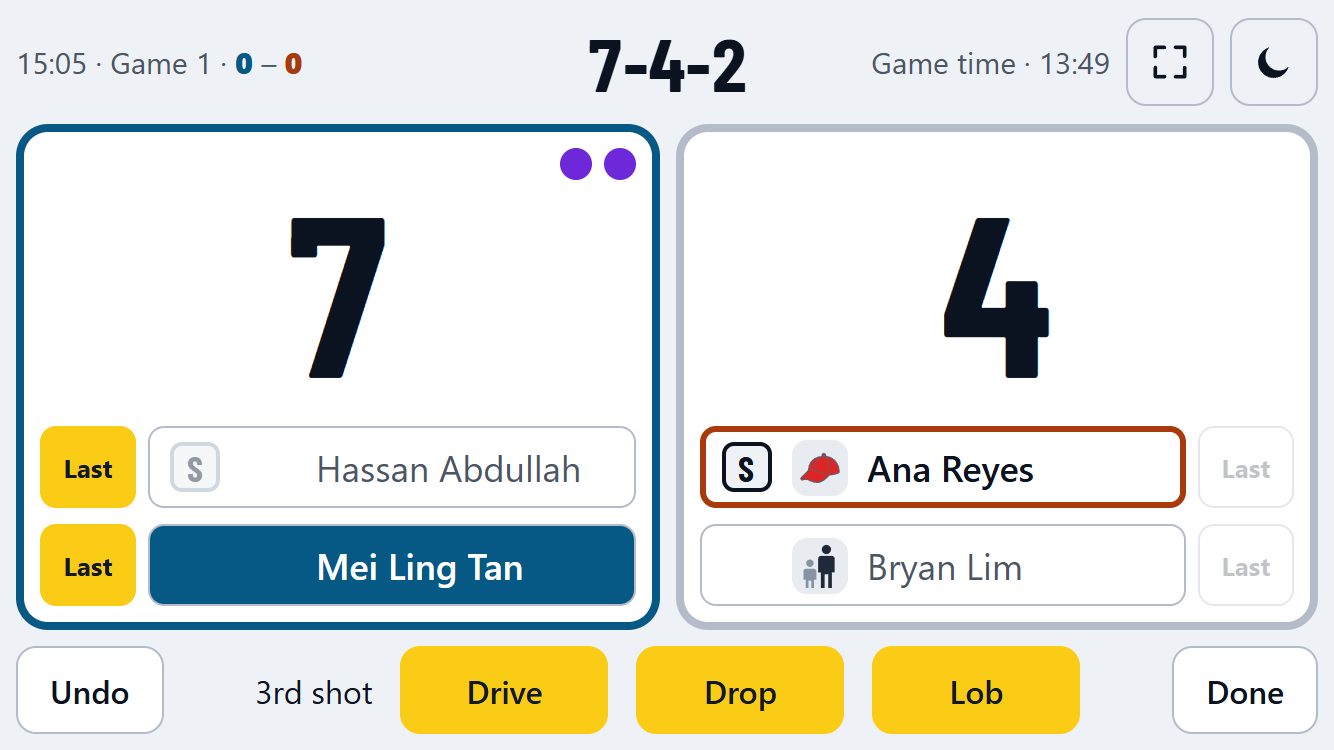
The count then brings one or two more questions, where they apply, each optional:
- 1 hit, won by the servers (the serve wasn’t returned): was it to the receiver’s Backhand or Forehand?
- 2 hits, won by the servers (a return error): from the Backhand or Forehand?
- 3 hits or more, either way: was the serving team’s 3rd shot, the one after the return, a Drive, Drop or Lob? It’s asked however the rally ended, so after a long rally, think back to how it started, or swipe it as it’s played (below). Count a drip (a softer drive that dips at the receivers’ feet) as a drive.
- 3 hits or more in doubles: who hit the last shot? Tap Last by that player’s name, at the outer edge of their court, where a thumb rests holding the phone sideways. Upright there’s no room beside the names, so the player’s whole name strip lights up yellow, marked Last: tap it. On 3 hits it was one of the serving team, on 4 one of the receivers, on 5+ any of the four, so only those buttons light up. In singles it’s asked only after 5+: a 3 or a 4 already says who.
The 3rd shot as it’s played
In a long rally the 3rd shot is easily forgotten by the end, so you can give it while the rally is played, without looking at the phone: as the serving team hits its 3rd shot, swipe the way the ball went, starting anywhere on the court or the strip above it (not the footer).
- Swipe down: a Drop (the ball drops).
- Swipe sideways, either way: a Drive (flat and hard).
- Swipe up: a Lob (the ball goes up).
For a moment the court is washed in the shot’s own colour, with its name in the middle: yellow for a drive, violet for a drop, green for a lob, so you can tell which from the corner of your eye without looking down. On Android the phone also buzzes twice (a rally buzzes once). A swipe never scores a rally: only a tap does. A short smudge, or a thumb sliding slowly, does nothing. Swipe again to change it.
In full screen, or opened from the home-screen icon, the scorer reaches the top of the screen, where a swipe down is the phone’s own (notifications, or the iPhone’s Control Centre). There a swipe starting right at the top edge is left to the phone: start it a finger’s width lower.
You can also tap: the footer’s corners hold Drive (bottom left) and Drop (bottom right), each marked “3rd shot”. The one given fills in its colour; tap it again to clear it, or tap the other to change it.
When the rally ends, give the hit count as usual: the 3rd shot is then already answered, and only who hit the last shot is left. A count of 1 or 2 means there was no 3rd shot, so it’s dropped; so does Skip, as the shot is kept with the count.
A swipe or tap is for the rally being played: once a rally is scored, the next one is. If you missed the moment, give nothing, and the 3rd shot is asked after the rally, as above.
A tap a little above either corner button does nothing, rather than scoring the rally for the court above it.
A long rally as it’s played
Once a rally has gone past 4 hits, double tap the court (either side) or the header’s left or right part. The court flashes grey with “5+”, the phone buzzes twice on Android, and a dark 5+ mark stays in the footer beside Undo until the rally is scored. Tap the mark to take it back.
When you score the rally, its count is already in: the hits buttons show 5+ chosen, and the Last buttons light at once, so with the 3rd shot swiped too, who hit the last shot is the only question. If the 3rd shot wasn’t given, it’s asked first, with “5+ hits” under it. Tap another count to change it.
So that a double tap never scores a rally, a single tap now scores it a third of a second later, once no second tap has come. Two taps further apart than that are a tap that scores the rally and then one too soon, as before; if that happens mid-rally, Undo it. The score in the middle of the header opens the rally history, as always, so double tap beside it, not on it.
Answering
The shot is asked in the footer and the last shot by the names, at the same time, in either order. Every answer to give is in yellow, so it stands out from the other buttons.
Each goes once it’s answered: tap the shot and the footer is the regular one again; tap Last and the buttons go quiet.
Done, or scoring the next rally, leaves the rest blank. After a game-winning rally, with no next rally to score, a yellow Done stays in the footer until the last shot is answered.
While a Last button is lit, its player’s name beside it takes no rally, so a tap just off the button does nothing.
Leaving a question blank
Leave a question blank when you can’t recall the 3rd shot or who hit last, or when a 1 wasn’t down to the serve (that fault by the receiving team), so the backhand and forehand figures stay about serves.
Anything you leave blank shows as grey Not recorded, so a chart never looks more complete than it is. A figure built on an answer appears only once it was given for at least half of its rallies, as for hit counts.
Backhand and forehand
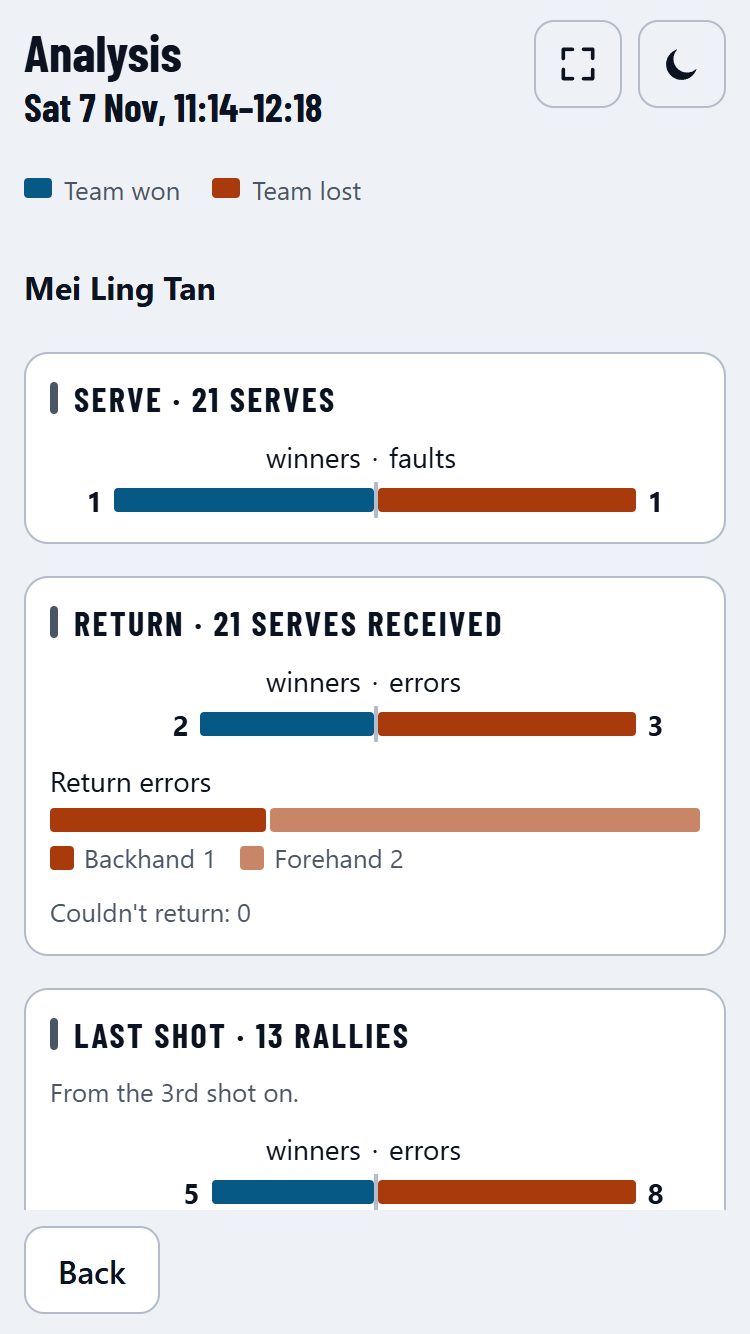
Backhand and forehand are the receiver’s, so for a left-handed player they swap. Tagging them Left-handed puts a reminder on the question.
The player’s Serve and Return cards then add bars split backhand and forehand, grey for those not recorded:
- Their serves not returned, by side and by receiver.
- The serves they couldn’t return, by side.
- Their return errors, by side.
The sides count only the rallies those shots ended: where the serves that were returned went isn’t recorded.
The 3rd and 4th shots
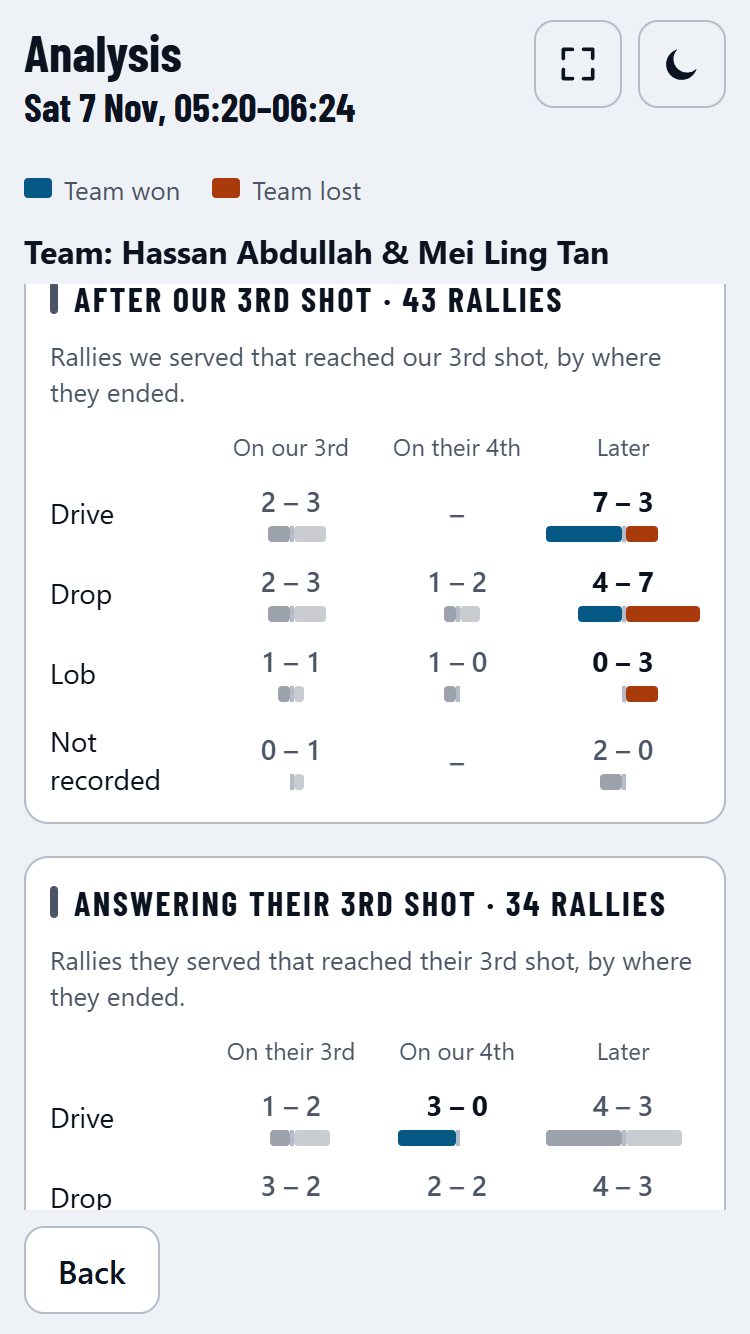
The 3rd and 4th shots get two cards:
- After our 3rd shot: the rallies the team served.
- Answering their 3rd shot: the rallies the opponents served.
Each is a grid: a row for each kind of 3rd shot (and one for those not recorded), a column for where the rallies ended (on the 3rd shot, on the 4th, or later). Each cell is its won – lost with a small bar. So “drops lost later on” is one cell to read, in colour while the even cells around it are grey.
With the kind recorded for under half the rallies, the cards show all 3rd shots together, with the weak-signal mark to say how many had a kind.
Insights can name a kind that fared better or worse than the team’s other 3rd shots, such as “Won 9 of 14 rallies after a 3rd-shot drive (other 3rd shots: 3 of 10)”. The serving team often loses more rallies than it wins, so a kind is set against the others, not against half.
Who hit the last shot
Who hit the last shot gives each player a Last shot card, from the 3rd shot on: won, not returned; lost, out or into the net. The team’s Ended by our shot and Ended by their shot cards gain a 5th shot or later row, as a long rally’s last shot is then known.
Insights then show whose they were in a bar beneath the line, such as “Lost 8 rallies on the 3rd shot (opponents: 4)” over Mei 3, Hassan 2 and Not recorded 3. They also add long rallies lost with your ball out or in the net, or won with a ball not returned.
Counting hits as a referee
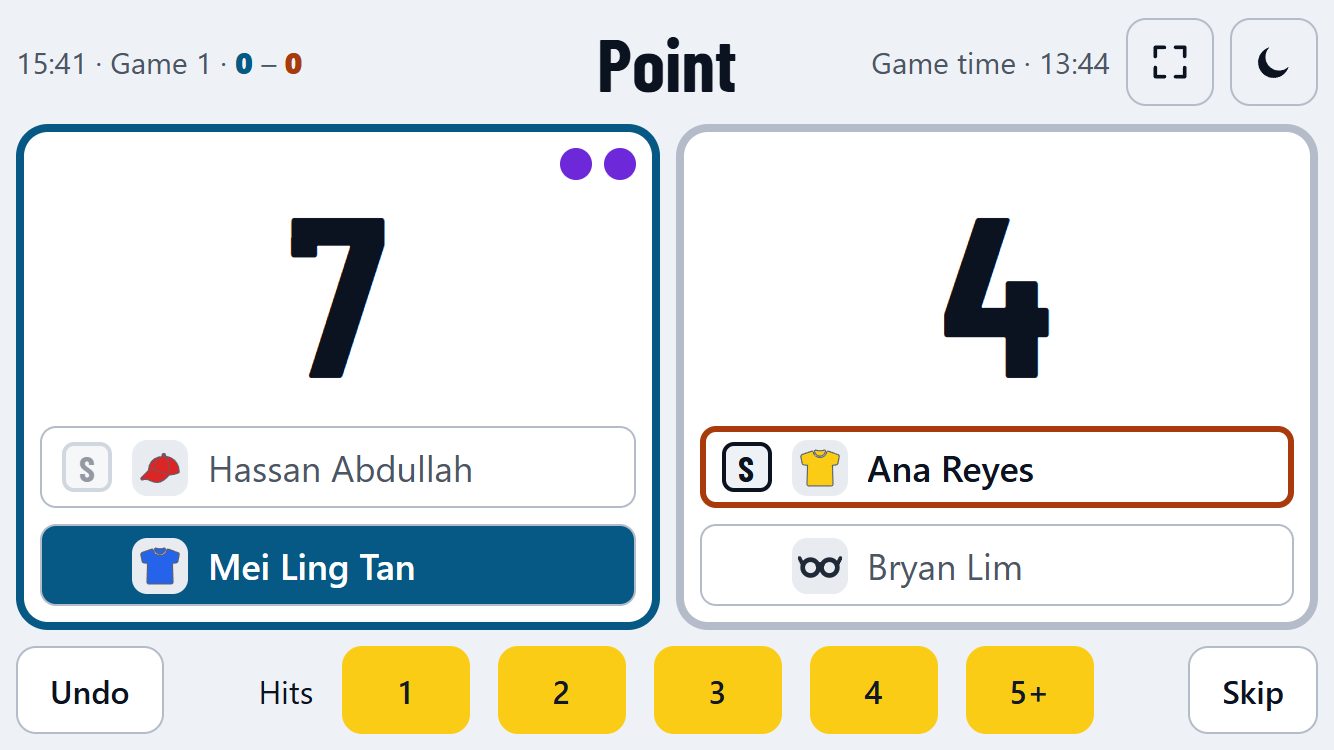
A referee can count hits too: switch on Count hits each rally in Match setup’s settings (Referee mode; off to begin with). It’s a second tap every rally, so it suits a match with time between rallies.
While the hits bar is up, the time-out buttons and More wait for a count or Skip; left untapped, the bar goes after 3 seconds, leaving that rally’s count blank. The shared result is unchanged: the counts stay on the phone, for its analysis, and go with a hand-over.